An app can look finished and still leave you asking, “What does this button actually do?”
That's why I start with an AI app PRD before I ask for the build. PRD means product requirements document. Don't let the name make it sound harder than it is. It's a written agreement about what we're making, who it's for, and what the first version needs to do.
I want AI doing the heavy work. But I don't want it quietly making the business decisions for me.
If you've got an idea for a coaching tool, a member app, or a small product, here's how I'd turn that idea into a plan I can actually direct.
Why I Start With an AI App PRD
“Build me an app” leaves a lot unsaid.
Who's using it? What do they come to finish? What information does it need? Does it work only on my computer, or will other people log in? What belongs in the first version, and what can wait?
If I don't answer those questions, the AI fills in the gaps. Sometimes that means extra features. Sometimes it means a nice-looking screen with no useful process behind it.
During a recent WCA group lesson, I demonstrated this with an inbox-cleanup app idea. Instead of starting with code, I asked AI to research what the app would need and prepare the requirements. Then I worked through its questions with short, plain-English answers.
One decision was especially concrete: label and archive messages, rather than delete them. That's not a color choice. It changes what the product does.
That demonstration wasn't proof of a finished, customer-ready product. It showed the planning process: bring a rough idea, have AI expose the choices, and direct the first version.
I've covered the broader process of building software with AI. Here, I want to zoom in on the document you create before that build begins.
Start by asking for a plan you can question, not a product you have to untangle.
1. Name the User and the Job
I don't start with a list of screens. I start with a person and a job.
For a coaching business, “an app for my community” is still too broad. It could mean a course library, a chat room, a calendar, or an assistant that answers questions about your teaching. Those are different jobs.
Here's an illustrative example: a coach wants members to leave each weekly lesson knowing what to do next. The job isn't “build a better community platform.” The job is “help a member find this week's lesson and leave with one clear action.”
That difference gives the AI something useful to plan around.
I'd write three lines:
- User: A current member who has a few minutes to find the next lesson.
- Problem: They aren't sure which recording to watch or what to do afterward.
- Useful result: They can open the right lesson and find its action checklist.
Now I can question every proposed feature. Does a leaderboard help that member finish the job? Do we need a social feed today? Maybe later. Neither is automatically part of the first build.
If you need help giving AI clear source material, my AI content brief covers that side. The app plan still needs its own user, workflow, and decisions.
Write the job in one sentence before you approve the features.
2. Cut the First Version Down to One Useful Win
I want the first version to do enough that I can use it and give meaningful feedback.
That's the point of an MVP: a minimum viable product. It isn't the biggest version I can imagine. It's the small version that lets me learn whether the core idea is useful.
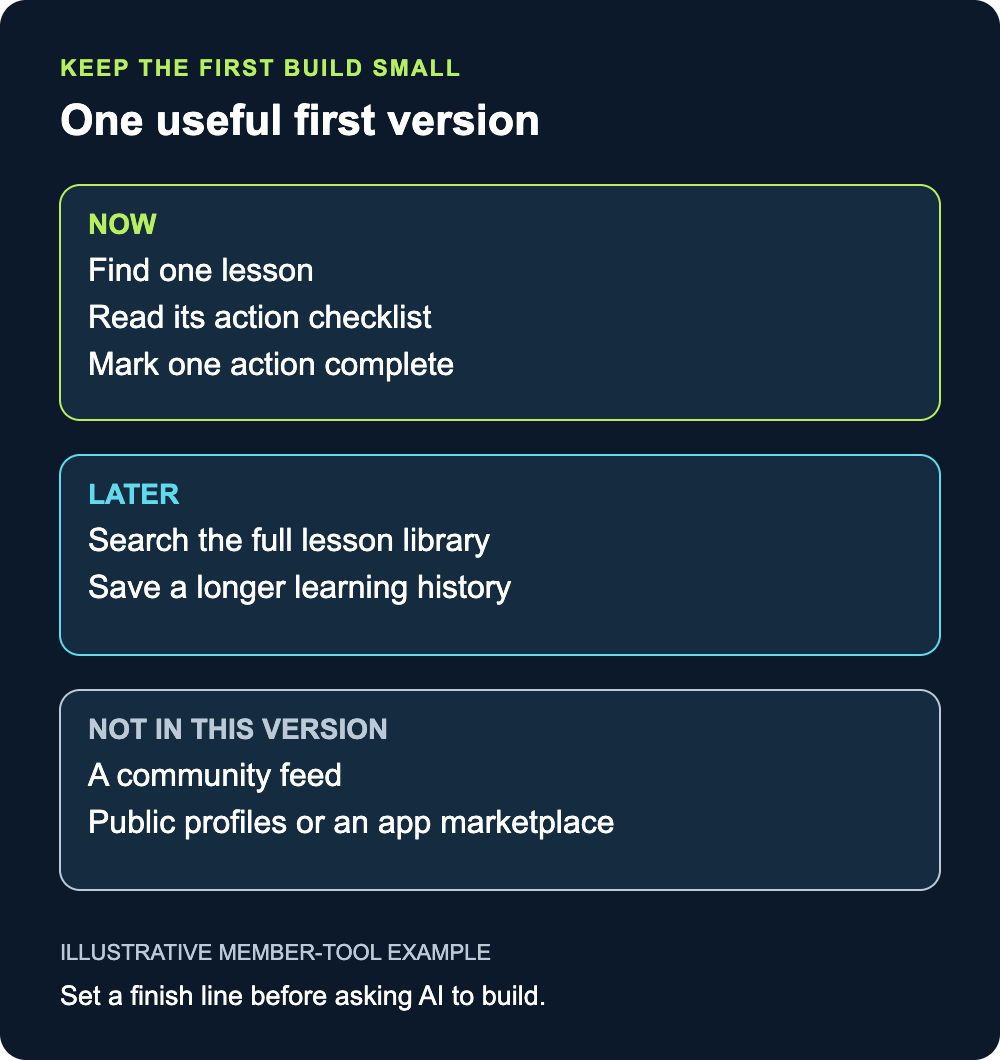
For our illustrative member tool, the first version might include one lesson, its checklist, and a simple way to mark an action complete. It doesn't need an entire course catalog to test that flow.
I'd divide the plan into three buckets:
- Now: Find a lesson, see the next action, and mark it complete.
- Later: Search the full library and save a longer learning history.
- Not in this version: A community feed, public profiles, or an app marketplace.
“Not in this version” matters. Without that line, every good idea can become another requirement.
I also separate the first private prototype from a product other people can use. Showing the core flow with sample information is one milestone. Handling real member accounts and their information is another. I want that difference written down, not hidden behind a working-looking screen.
You aren't saying no to the bigger vision. You're giving the first build a finish line.
Choose one useful flow you can test from beginning to end.
3. Make AI Surface the Decisions
You don't need to sit down and write a technical document from scratch. Have AI research the idea and ask you what it needs to know.
In the group lesson, I showed how short answers can steer a much larger plan. You can answer the important questions without writing a novel about each one.
I would start with questions like these:
- Who is the first person this needs to help?
- What should they finish in their first visit?
- What information will the app need from them?
- What should it never do without their say-so?
- Which features can wait until we've tried the core flow?
If AI hands you a wall of technical language, don't pretend you understand it. Ask it to translate that language into decisions.
Here's the instruction I'd use:
Explain this to me like a nontechnical business owner. Tell me which decision I need to make, what each option changes for the user, and what you recommend. Separate decisions you need from me now from details that can wait.
That's different from asking it to make everything sound simpler. I want to know what I'm deciding and why it matters.
And I don't need to answer every possible question in one sitting. Start with the questions that shape the first version. Keep the others visible rather than letting AI assume you've answered them.
Ask for the next decisions, not another pile of jargon.
4. Turn Your Answers Into an AI App PRD
Once we've got the important answers, I want them pulled into one document. Not scattered across a long chat where an old assumption can sneak back into the build.
Here's a prompt I'd use. Replace the bracketed parts with your own answers:
I want to build [app idea] for [specific user]. Their main problem is [problem], and the first useful result is [outcome].
Research what is needed and draft a product requirements document for a lean first version. Keep the explanation clear for a nontechnical business owner.
Include the user, the main workflow, required information, must-have features, features we're postponing, and what a working first prototype should demonstrate.
Ask me about unresolved choices. Don't silently decide the product's purpose, budget, or how it should use people's information. Explain technical options through their effect on the user and the business.
Separate a private prototype using sample information from a version intended for real customers. List what would still need review before that next stage.
Start with the most important questions. After I answer, revise the document before proposing the build.
For the member-tool example, the finished summary could say: “A member opens one lesson, reads its action checklist, marks one action complete, and sees that choice still recorded when they return.”
Now “it works” means something I can check. I'm not just approving a design because it looks impressive.
I also want assumptions labeled. If we haven't settled how lessons will be added, that belongs under open questions. It doesn't belong in the plan as a decision I supposedly made.
Approve a clear description of the work before asking AI to carry it out.
5. Review a Working Prototype, Then Reset the Plan
When the plan is clear enough, I ask for the first working prototype and a way to try it.
Then I test the promised flow. In our example, can I find the lesson? Is the checklist there? Can I mark the action complete? Does the app remember it when I return?
I give specific feedback. “This doesn't feel right” is a starting point. “The action checklist is hidden below the video; put it beside the lesson so I can find it” gives the next revision a clear job.
I also ask for a report: what's working, what's incomplete, and what needs a decision from me? A prototype is useful partly because it makes those gaps visible.
As the project changes, I update the plan. In the WCA lesson, I explained that I sometimes ask for a new requirements document at the next milestone. That gives the AI a current direction instead of a growing pile of conflicting requests.
If I have ideas for a bigger version while the first one is being built, I can brainstorm them separately. I don't need to turn every thought into a change to the current assignment.
Try the actual flow, give concrete feedback, and keep the next build tied to the current plan.
Build Something You Can Direct
You don't need to become a programmer before you can make useful product decisions.
You do need to name the customer, choose the first useful result, answer the questions that shape it, and review what comes back.
That's what I want from an AI app PRD: a shared plan I can understand, challenge, and use to guide the next version. Not paperwork that delays the work. Not a promise that a prototype is ready to sell.
Pick one app idea. Write the user and the job in three lines. Then use the prompt above to find the decisions you're missing.
If you want help turning your expertise into useful offers and directing AI to do the production work, explore Wealthy Coach Academy. That's where I teach this process and work through the questions with you.
About Jeremiah Krakowski
Jeremiah Krakowski is a coaching business mentor who helps coaches, course creators, and consultants scale from $3k/mo to $40k+/mo using direct response marketing, AI systems, and proven frameworks. He runs Wealthy Coach Academy and has 23+ years of experience in digital marketing. Learn more →