I don't want AI to invent a personality for my business. I want it to help get my actual ideas out into the world.
That's why an AI content brief needs more than a topic and the words “make it sound like me.” It needs to tell the tool what it's producing, what teaching to use, and what a finished piece looks like.
Otherwise, you get a polished draft that misses the point. Then you spend your afternoon explaining yourself again.
The answer isn't another paragraph about your tone. It's a clearer job.
Your AI content brief should define the finished job
On a recent Wealthy Coach Academy call, I showed a finished course made from recorded teaching. The lessons had captions, checklists, and transcripts. The ideas were already in the recordings. The production work turned those ideas into something people could use.
That's the distinction I want you to see.
Your expertise is the source. The recording captures it. AI can help organize and produce it. Those are different jobs.
I've written about using AI without losing your authenticity. But knowing you should keep your voice doesn't tell an AI editor which five minutes to use, what claim it can make, or when its work is ready for review.
That's what the production brief is for.
Think about hiring an editor. “Make something good from this call” leaves a lot open. “Make one lesson that helps a beginner write a clear offer, using this section, with a checklist at the end” gives that person a job they can finish.
I want you to make the same shift with AI. Don't just describe the subject. Describe the deliverable.
1. Give it one source and one specific teaching point
Start with material where you've already explained something clearly. That could be a call recording, a transcript, a voice note, or an article you've written.
Then narrow the assignment.
An hour-long call might cover offers, follow-up, pricing, and content. Asking for a post “based on the call” gives the tool room to mix all four into one confused article.
Instead, identify the lesson you want it to preserve. For example: follow up differently with someone who missed a webinar than with someone who watched and still has a question.
That's a usable teaching point. It gives the piece a center.
You can ask AI to find candidate passages first. Just make it show you the source section before it starts expanding the idea. Check that the passage actually supports what it says you taught.
And when you're using a group call, keep the public article focused on your teaching. A student's private situation isn't automatically material for your marketing.
Your first instruction: use this source, preserve this lesson, and leave unrelated material out.
2. Tell it who needs the piece and what they'll do next
“Write for entrepreneurs” doesn't tell an editor much.
“Write for a coach who has recorded a webinar but hasn't built the follow-up yet” is much clearer. Now the tool knows where the reader is in the process.
That context changes what belongs in the article. This reader doesn't need a history of webinars. They need to understand which messages come next and why.
Then name one action the reader should be able to take. Not “feel inspired.” Not “understand the power of automation.” Something they can actually finish.
For that example, it could be: sketch three follow-up paths for a no-show, a viewer with questions, and a buyer.
Those are illustrative paths, not a rule that every business needs exactly three. The point is to give the article a practical destination.
I also want the piece to have one primary job. A course lesson can teach a process in depth. A short video might challenge one mistaken assumption. A blog can explain a decision and give the reader a useful next step. Don't ask every asset to do everything.
Your second instruction: help this person take this next step.
3. Separate the production work from the decisions you keep
This is where delegation gets useful.
You don't need to personally remove every repeated sentence, format every heading, or draft every image description. You do need to decide whether the finished piece says something you believe.
Give AI room to do the production work. Ask it to organize the teaching, tighten the writing, propose headings, and prepare the supporting assets.
But name the things it shouldn't invent:
- A client result you never shared.
- A personal story that didn't happen.
- A quote that wasn't in the recording.
- An offer, price, or promise you haven't confirmed.
If the source doesn't contain proof for a claim, the tool should flag the gap. It shouldn't fill the space with an impressive-sounding number.
You can still use a made-up example to teach a process. Just label it as an example rather than passing it off as a customer story.
The same boundary applies to graphics. An illustration can make a concept easier to understand. A fake screenshot suggesting a result is something else entirely.
Your third instruction: improve the presentation without inventing the substance.
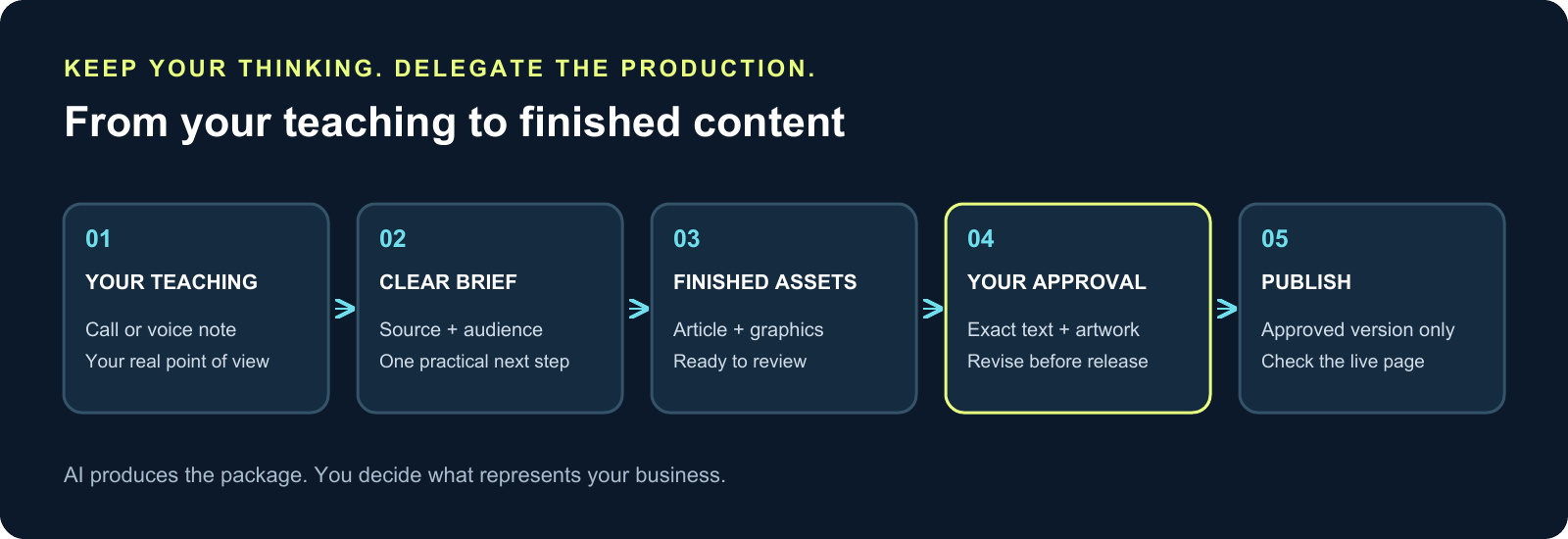
4. Use this AI content brief before the next draft
Here's a starting brief you can copy and adapt. This is an example of how to turn the principle into a clear assignment—not a claim that one prompt will produce a perfect article every time.
Source: Use the attached transcript. Focus on the section where I explain the selected teaching point. Show me the supporting passage first.
Audience: Write for a coach or course creator who is at this specific stage: [describe their situation].
Reader action: By the end, help them [name one practical action].
Deliverable: Prepare one complete blog article, a suggested title and URL slug, a meta description, and a featured graphic. Include a useful inline visual if the explanation needs one.
Keep intact: Preserve my main argument, the important distinctions, and the practical advice. Make it clear and conversational. Don't add a different philosophy because it sounds polished.
Do not invent: No new personal experiences, customer stories, quotations, results, or unverified offer details. Flag missing evidence. Label illustrative examples.
Ready for review: Deliver the full article and actual graphics together. Check the links and image wording. List anything that still needs my decision. Do not publish.
Notice what's in there: source, audience, action, deliverable, boundaries, and a finish line.
You can use the same structure for other work. Replace “blog article” with a finished lesson, an email, or an edited clip. Then change the requirements to fit that asset.
A video editor needs the original recording and clear selection criteria. A lesson needs a teaching outcome. An email needs a reason to send it and one next step. The brief should reflect the work, not just repeat your brand description.
Your fourth instruction: define what must come back, not just what the tool should start doing.
5. Review the whole package, not just the writing
An outline isn't a finished article. An image prompt isn't a finished graphic. “I've prepared the content” doesn't tell you whether any of it is ready to use.
Ask for the actual package.
Read the article next to its featured image. Does the image make a bigger promise than the writing? Does the title match what the reader will get? Does the call to action lead to the right place?
Then check the piece against the source. AI can make a sentence smoother while quietly changing its meaning. A suggestion can become a guarantee. A hypothetical example can start sounding like a real result. Catch those changes before they become public.
I would also read a few paragraphs out loud. If you wouldn't say the sentence to someone on a call, fix it. You don't need every line to be clever. You need it to be clear, useful, and recognizably yours.
Keep the final review specific. “This doesn't sound like me” may be true, but it gives the editor little direction. “Keep the practical example, remove the dramatic opening, and use the simpler explanation from the recording” is an instruction it can act on.
If producing content regularly is the hard part, making content in the middle of chaos is a useful companion. A clear brief helps you hand off production without needing to stay beside it the entire time.
Your fifth instruction: bring back finished work I can judge, and make revisions against that work.
Put one real teaching moment to work
You don't need to rebuild your whole content system today.
Pick one thing you've already explained well. Find the recording or transcript. Decide who needs that lesson and what you'd like them to do with it. Then give AI a production assignment with a clear finish line.
Start with one article. Review it with its graphics. Keep what works, correct what misses, and save the brief so the next assignment starts with better instructions.
That's the point of an AI content brief: less time explaining the same job again, and a clearer path from your real teaching to a piece you're willing to put your name on.
Your ideas stay yours. The production becomes work you can delegate.
If you want help putting these kinds of systems to work in your coaching business, see what's inside Wealthy Coach Academy.

About Jeremiah Krakowski
Jeremiah Krakowski is a coaching business mentor who helps coaches, course creators, and consultants scale from $3k/mo to $40k+/mo using direct response marketing, AI systems, and proven frameworks. He runs Wealthy Coach Academy and has 23+ years of experience in digital marketing. Learn more →